
Follow the steps below in order to insert your letterhead into a letter template.
NOTE: Your company letter head will need to first be saved in set default sections as outlined in the article below. You may need to ask an agent to assist you with this.
How to create a default header and footer
- Choose any lease or go to the particular lease that you want to send a letter to.
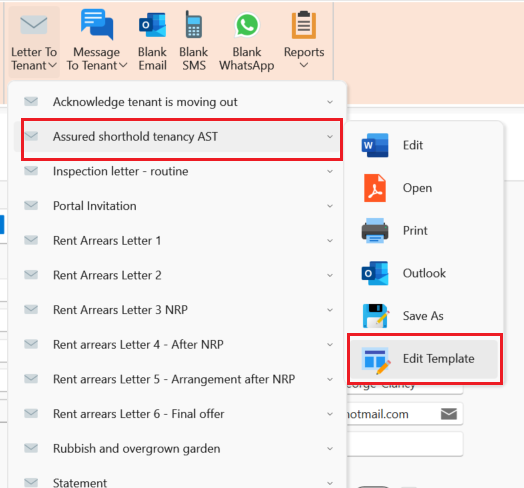
- On the page ribbon click on Letter to tenant (This can be done with any type of letter)
- Select the letter you would like to add your letter head to, then click Edit Template :
- Click on Attached Documents then select Insert Default Layout
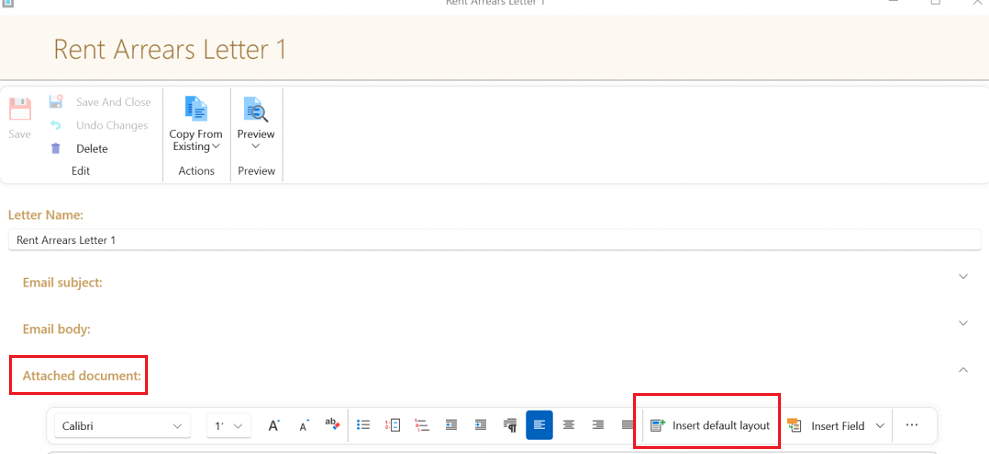
This will automatically bring in your Letterhead into this particular letter for all tenants.
You will need to follow the steps above for each letter that you would like your letterhead to be used as a template.