
Overview
The Find Missing Certificates tool helps you identify properties that are missing required certificate requirements based on your current compliance rules.
This is especially useful after you:
- Create a new certificate type
- Update rules (e.g. Applies to Units or Buildings)
- Change compliance requirements across your portfolio
See the following article on how to set up and select default certificates
Add a new certificate type - Default certificate list
You can access this tool from the main navigation:
- Go to Certificates
- Click Find Missing Certificates
What This Tool Does
When opened, the window will automatically begin scanning your system for missing certificate requirements.
Example:
If you create a new rule requiring Fire Alarm certificates for all buildings, this tool will:
- Find all buildings that do not yet have that certificate requirement added at all
Important: Missing Requirement vs Missing Document
It’s important to understand the difference:
- Missing Certificate (Dashboard)
- The requirement exists on the property
- The document has not been uploaded yet
- This is tracked and visible on the dashboard
- Missing Certificate (Find Missing Certificates tool)
- The requirement itself does not exist on the property
- The system is not tracking it at all yet
- This tool finds and fixes that gap
In short:
- Dashboard = “document missing”
- This tool = “requirement missing”
Reviewing Results
Once the scan is complete:
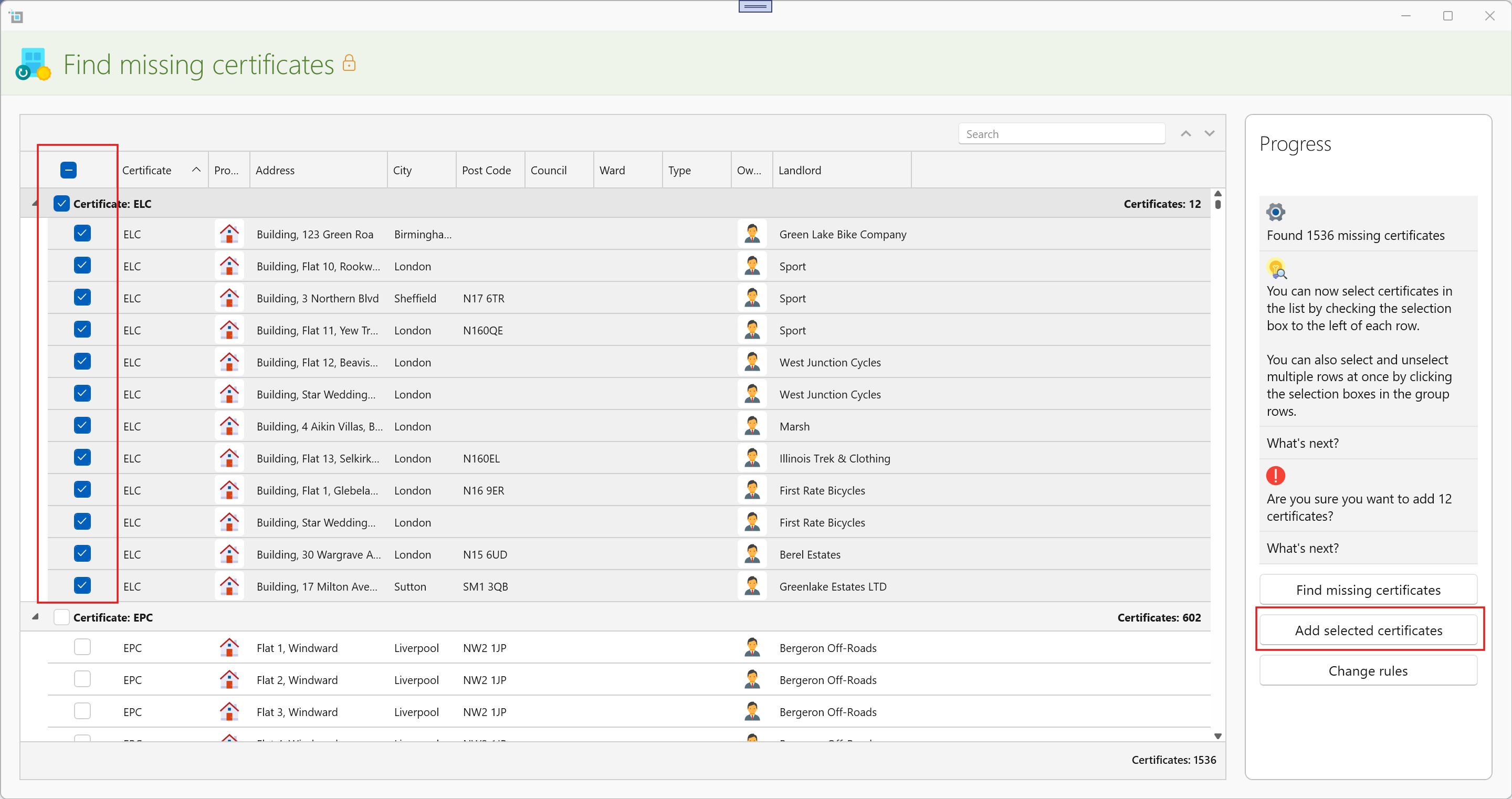
- All properties missing required certificates will be listed
- You can:
- Filter the results
- Review each property
- Select or deselect individual entries
You can also:
- Select all results
- Unselect specific exceptions (for example, properties you know do not require that certificate)
Adding Missing Certificates
Once you are happy with your selection:
- Use the left-hand panel
- Click Add Selected Certificates
The system will then:
- Automatically add the missing certificate requirements to those properties
- Ensure they are now properly tracked
What Happens Next
After adding the certificates:
- These properties will now appear on the dashboard if documents are missing
- Expiry tracking, warnings, and compliance rules will apply as normal
- The certificates are now fully part of your compliance workflow
When Should You Use This Tool?
Use Find Missing Certificates when:
- You introduce a new compliance rule
- You update Applies to Units or Buildings settings
- You want to bring existing properties in line with current rules
- You suspect some properties are not being tracked correctly
Summary
- Finds missing certificate requirements (not missing documents)
- Lets you review and control what gets added
- Bulk-adds certificates to ensure full compliance tracking
- Keeps your dashboard accurate and complete