
Set Up Invoice Frequency Rules: Limit How Often Invoices Are Raised
Avoid billing mistakes and accidental duplicates with this smart validation feature for ledger accounts.
What this feature does
Some ledger accounts can be configured with duplicate invoice warning rules, which alert you when too many invoices have been entered for the same property within a specified time period.
This helps you:
Prevent accidental duplicate entries
Avoid overcharging landlords
Keep your invoice history clean and consistent
How the rule works
You can configure each relevant ledger with:
Quantity – maximum number of invoices allowed
Period – how far back the system checks (e.g. 1 month, 12 months)
When entering a new invoice:
The system checks for previous invoices with the same property and same ledger
If the number already entered within the selected period exceeds the limit, a warning is shown
The invoice is not blocked — just flagged for review.
How to set up
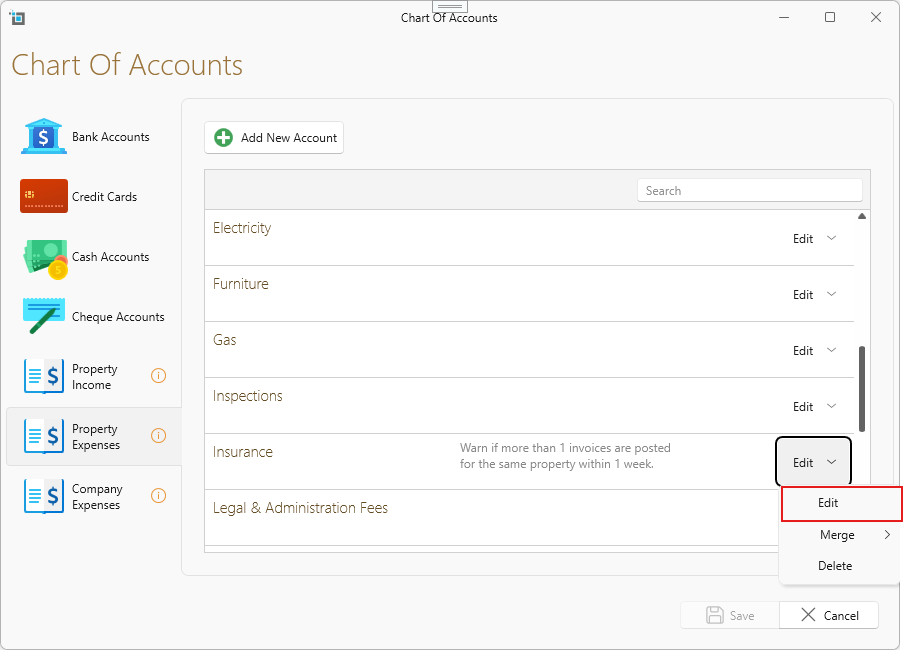
Go to Control Panel > Chart of Accounts, then click the Edit dropdown on any applicable ledger.
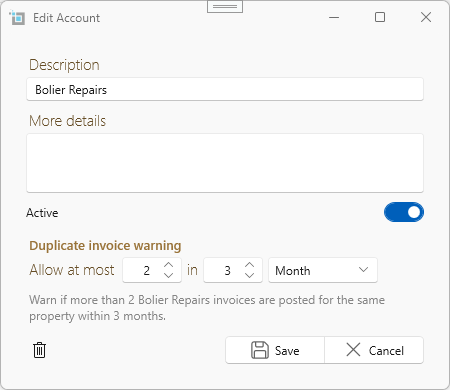
You’ll see fields to enter:
The maximum number of invoices allowed
The time period in days, weeks, or months
Set both values to activate the rule.
To turn it off, simply set either value to 0.
Disabling the warning
To turn off duplicate invoice warnings for a ledger:
Set Quantity = 0, or
Set Period = 0
Either option disables the rule entirely for that ledger.
Useful examples
Insurance Invoices: Limit to 1 per year to prevent double billing
Boiler Repairs: Limit to 2 in 5 years to flag repeat charges
Want to know more?
This article covers rules you set up yourself per ledger to manage repeated invoices.
If you’re instead looking to detect exact duplicate invoices (same date, amount, property, and description), we’ve got a built-in feature for that too.
Read more here – Prevent Exact Duplicate Invoices
(Covers automatic detection of exact duplicates without needing to set up ledger-based rules)