
Charge VAT for commissions by default for new tenancies.
- On the main ribbon go to Control Panel.
- Click Settings.
- Select the Owners tab.
- Check the Charge VAT on commission by default.
- Click Save.
This will not affect existing tenancies.
To start charging VAT for existing tenancies, open them individually and change the VAT settings as shown below.
Charge VAT for commission for specific tenancy.
- Open the tenancy page based on the tenant name you see on the transaction line.
- In the More tab make sure Commission VAT is switched on.
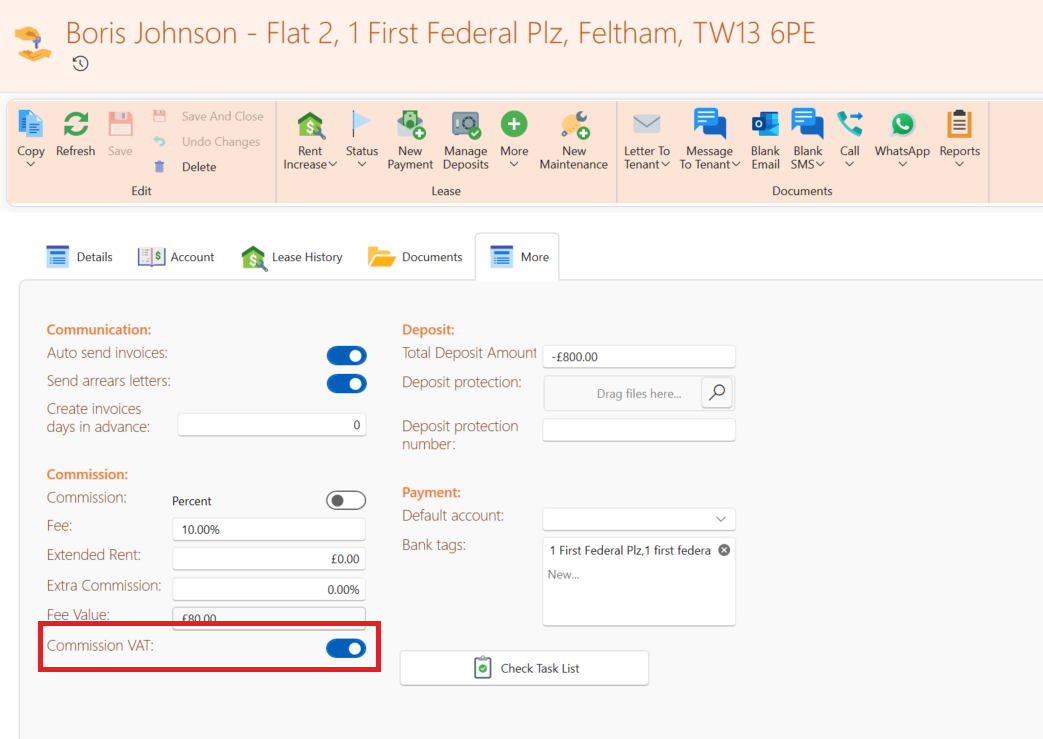
- If it was off by mistake, switch it back on and save. You still have to rectify existing payments which didn't include VAT.
This is how to do it recalculate VAT for existing payments:
- On the lease page go to the Account tab.
- Find the relevant payment based on the description.
- Click on the icon to to open the payment.
- Check the last column in the table with the header named VAT. It's probably zero.
- Click Unapply All and then apply again to the correct invoices.
- Click Save. This will recalculate the VAT of this payment.
- You can open the payment again and check the VAT column to ensure the VAT is calculated.