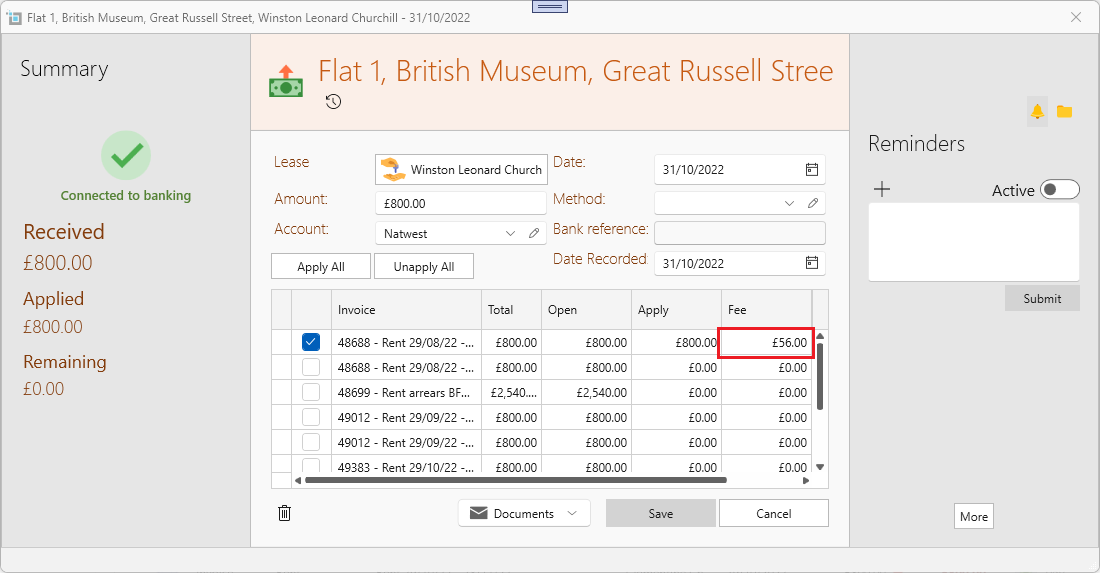
This is how to update commission charge for existing tenant payments:
When you change the commission on the tenant page it will only affect all payments collected in the future.
Commissions charged for existing payments won't be changed by default. It only affects future payments.
To update the commission for an existing payment:
- Find the correct lease.
- On the More tab under the correct lease, change the commission in the Fee box to the desired fee. Click on Save
- Open the payment for which you want to adjust the fee by clicking on it.
- Click Unapply all, and then Apply All (Or apply to whichever invoice you want to).
- Save and close.
- The new commission will be applied to this payment.
- If you want to check that, open the payment again and check the values under the Fee column. You should see the updated fee value.
- If you wish to revert to the previous commission rate, go back to the More tab under the lease and change it there.
See below a picture of an open payment, after clicking save the fee will automatically be updated.