
The following instructions will explain how to send out tenant invoices in bulk.
On the main ribbon click on Expected Rent.

This will take you to a new window called Expected incoming Payments.
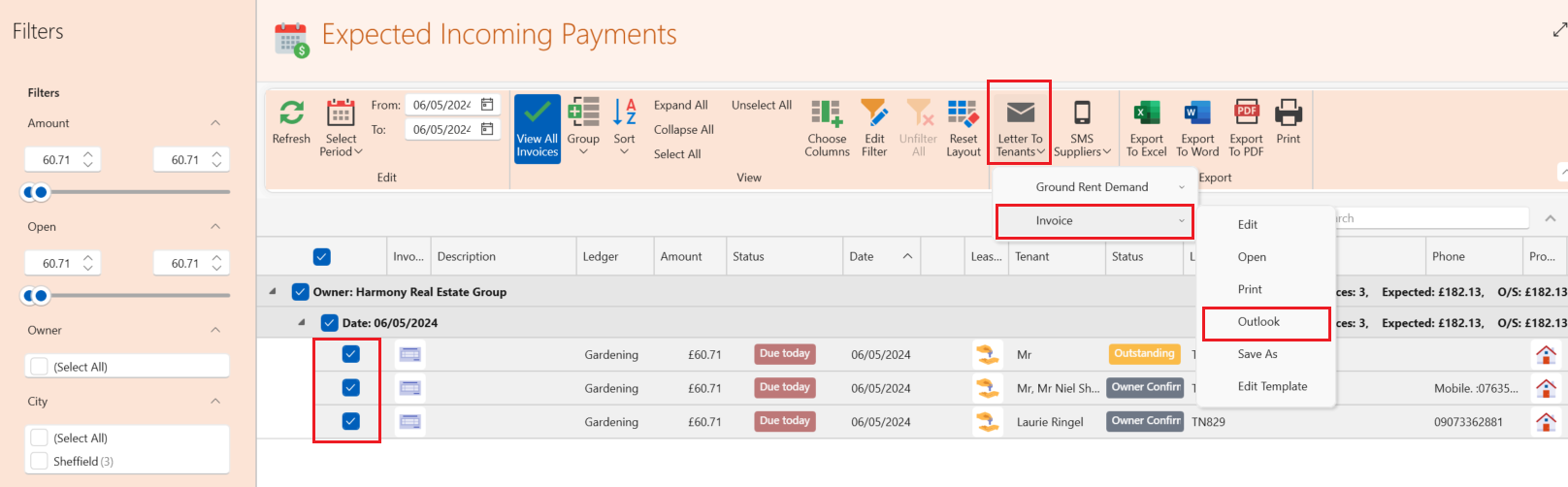
- Click on the box next to the invoices you wish to send - This will highlight the box blue.
- From the top ribbon select Letter to tenants.
- Click Invoices.
- Then select the method you would like to use to send the invoices e.g. outlook.
- All selected invoices will then be sent to the tenants.
Dashboard - Rent Collection
Alternatively you can reach the Expected incoming payments window by going to the dashboard to the section called Rent collection and clicking on any underlined figure as shown below.
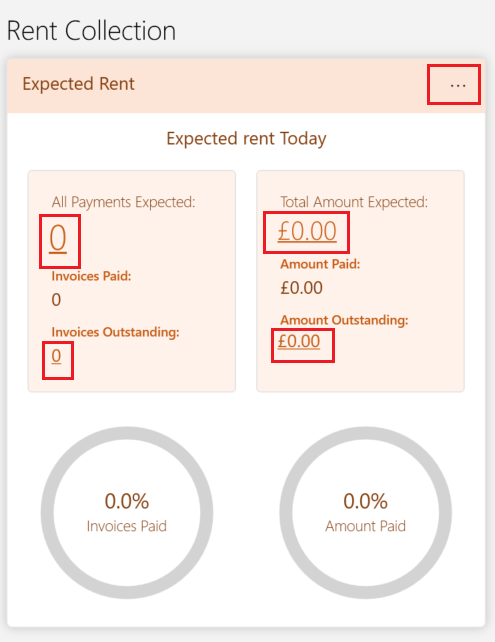
The Rent collection section is useful to understand what is owed by the tenant this can be any of the following:
- Open - Rent invoices
- Open - Service charge invoices
- Open - Non rent invoices
You can adjust the dates shown by selecting the three dots in the top right corner to show what is owing in different periods e.g in the last 7 days or in the last month.